
What Is Vinyl?
For starters, vinyl comprises two different components. The top layer is the actual vinyl and contains a sticky adhesive backing. It’s the material that you’ll cut and apply to craft your project. The second layer represents a paper liner. Vinyl is much like a sticker whereby you have the sticker on the back and the paper lining that curbs it from accidentally attaching to things. While you can apply vinyl to most flat surfaces, it works best on non-porous materials ranging from plastic and glass to walls.What Is Cricut Design Space?
It’s the program you’ll require to design and cut Cricut projects. So, after setting up your Cricut machine, the next course of action is to install Design Space. It’s easy to learn and, most importantly, free. The cloud-based nature of Design Space allows you to access your files at any time and from any device. So, you can start on your laptop, work offline, and proceed on your tablet or smartphone, all without breaking stride. Then, you can come up with a design from scratch or take your pick from the barrage of ready-to-make projects. Place your vinyl on a mat, load it in the Cricut machine, press ‘Go,’ and let it handle the rest.How to Use Cricut Vinyl
There are various types of vinyl. So, your surface will determine the ideal type to use for your given project. Don’t confuse iron-on with vinyl. Synonymous with Heat Transfer Vinyl, iron-on is heat-activated vinyl that’s mostly used on clothing. It demands a heat press or iron to activate the adhesive backing. The best way to differentiate the two is to keenly check out the back of the vinyl. The iron-on counterpart has a clear liner at the top, whereas the actual vinyl is layered below. Permanent and removable vinyl has a paper liner with a grid.Should You Use Removable Or Permanent Vinyl?
Removable vinyl is perfect for temporary décor because it doesn’t leave any residue behind and is easily changeable from one season to another. Contrarily, permanent vinyl has a durable adhesive bond and is the go-to for projects that are more susceptible to wear and tear. So, these include windshields, mugs, and cups. Along with various strengths, vinyl also comes in a vast assortment of finishes ranging from foil, matte, and shimmer, to holographic.The Step By Step Process of How to Cut Vinyl on Cricut
For starters, here’s a breakdown of the tools of the trade.- Cricut cutting machine
- Green standard grip mat
- Weeding tool, ballpoint pen, or sewing needle
- Transfer tape
- Enamel base
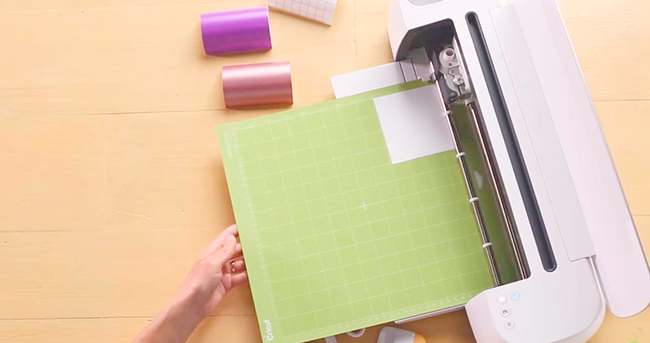
- Upon designing your project in Design Space, place a green standard grip mat on a flat surface right in front of you. Ensure you take out the clear liner and place it within arm’s reach.
- Unroll the vinyl with the paper liner side facing downwards. Align the corners of the grid along the top of the grip mat. Layer out the vinyl on the entire mat, ensuring it’s safely adhered to it.
- In Design Space, choose the particular type of vinyl you’re working with. With the various types of vinyl available, the cut settings differ in each type.
- Insert the mat into a Cricut machine. Remember, a fine-point blade works best when it comes to cutting vinyl.
- After the cutting process, unload the mat during which it’s advisable to keep your vinyl attached to the mat and start the weeding.
- To weed the vinyl, you can use a sewing needle, ballpoint pen, or weeding tool to eradicate the negative pieces of vinyl from your image. The process is a breeze when the vinyl is still on the mat as it firmly holds it in place.
- Cut, a piece of transfer tape of approximately the same size as your design. Take out the paper liner from the back of the tape. Then, lay the tape over the image while using the grid lines as a guide to line everything up.
- Turn the Cricut Mat upside down and pull it away from the vinyl. Doing so safeguards the vinyl against bubbling or damage.
- Use a scraper tool to burnish your design onto the transfer tape. Slowly and gently peel the tape from its paper backing at an angle of 45 degrees. If the vinyl fails to transfer onto the tape, and lay it back down and re-burnish it.
- Clean the surface on which you’ll apply the vinyl. It’s essential that it’s free of oils or debris that can negatively impact the vinyl’s adhesion. So, use rubbing alcohol and a paper towel to ensure the surface is spick and span and dry.
- Place the transfer tape onto the object to which you’re transferring. Do so carefully to ensure the transfer is not only straight but also precisely aligned. Then, use a scraper to burnish the image onto the base to ensure the sticky backing completely adheres to the surface.
- Carefully and slowly pull the transfer tape away from the design at a 45-degree to unveil the final product.
- Allow the vinyl to entirely cure for 24-48 hours before you wash it or expose it to water. In turn, this allows the backing to fully attach to the material on which it’s placed and provide a long-lasting outcome.